
My AI Knowledge Sidekick's Blueprint: A Decoupled Architecture for Dynamic Knowledge Synthesis & Analysis
Post 2 / 3 of building my personal AI Knowledge sidekick

From a Static Report to a Living System
In my last post, I shared the "why" behind my personal AI knowledge sidekick1. A dream to transform information overload into amplified intelligence. Now, let's get into the "how."
As I built the initial prototype, I realised a simple, one-shot pipeline wasn't enough. I didn't just want a daily email summary; I wanted a dynamic, living knowledge base I could explore and question on demand. This required a more sophisticated architecture. One that separates the heavy lifting of data processing from the interactive joy of discovery.
Let’s get into the blueprint for the system I built.
A Decoupled, Two-Stage Workflow
The system is designed as two distinct parts that communicate through a central database. This decoupled approach makes it robust, scalable, and incredibly flexible.
Stage 1: The Ingestion Engine (run_ingestion.py)
This is the powerful, automated backend. It's a standalone Python script designed to run headless on a schedule. Its only job is to constantly enrich the knowledge base. It connects to the Readwise API, fetches new articles, and performs a "first-pass analysis" on each one—generating a summary, tags, and structured attributes—before saving all the information to a central SQLite database.
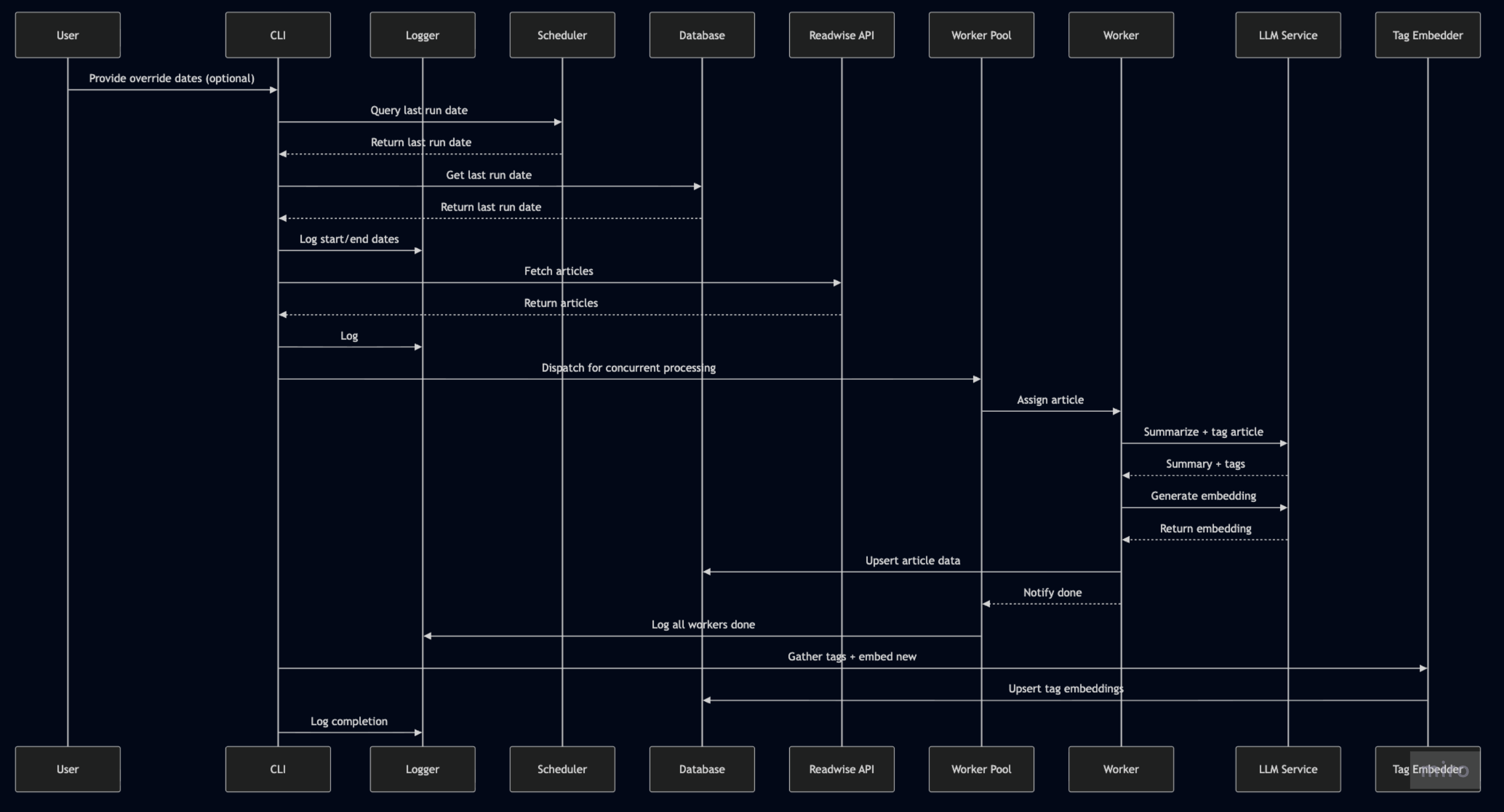
Stage 2: The Exploration UI (The Streamlit App)
This is where the magic becomes tangible. The Streamlit app is the interactive frontend, a pure "viewer and controller" for the enriched data. It's where I explore my knowledge base, filter it, and trigger deeper, on-demand analysis.
This two-stage design is a game-changer. The heavy processing happens efficiently in the background, while the UI remains fast, responsive, and focused on exploration and synthesis.
On-Demand Synthesis
The most powerful feature this architecture unlocked is the AI Synthesiser. I can now use the Streamlit UI to:
Create a specific cohort of articles using powerful filters (e.g., "all articles from the last two weeks tagged with 'AI agents'"). I can also save and load filter combinations as presets.
Get AI-powered tag suggestions to help me expand or refine my selection based on the current context.
View a pre-synthesis analysis, including a word cloud and an estimation of the cost and time required for the synthesis.
Trigger a new, targeted synthesis on that subset only.
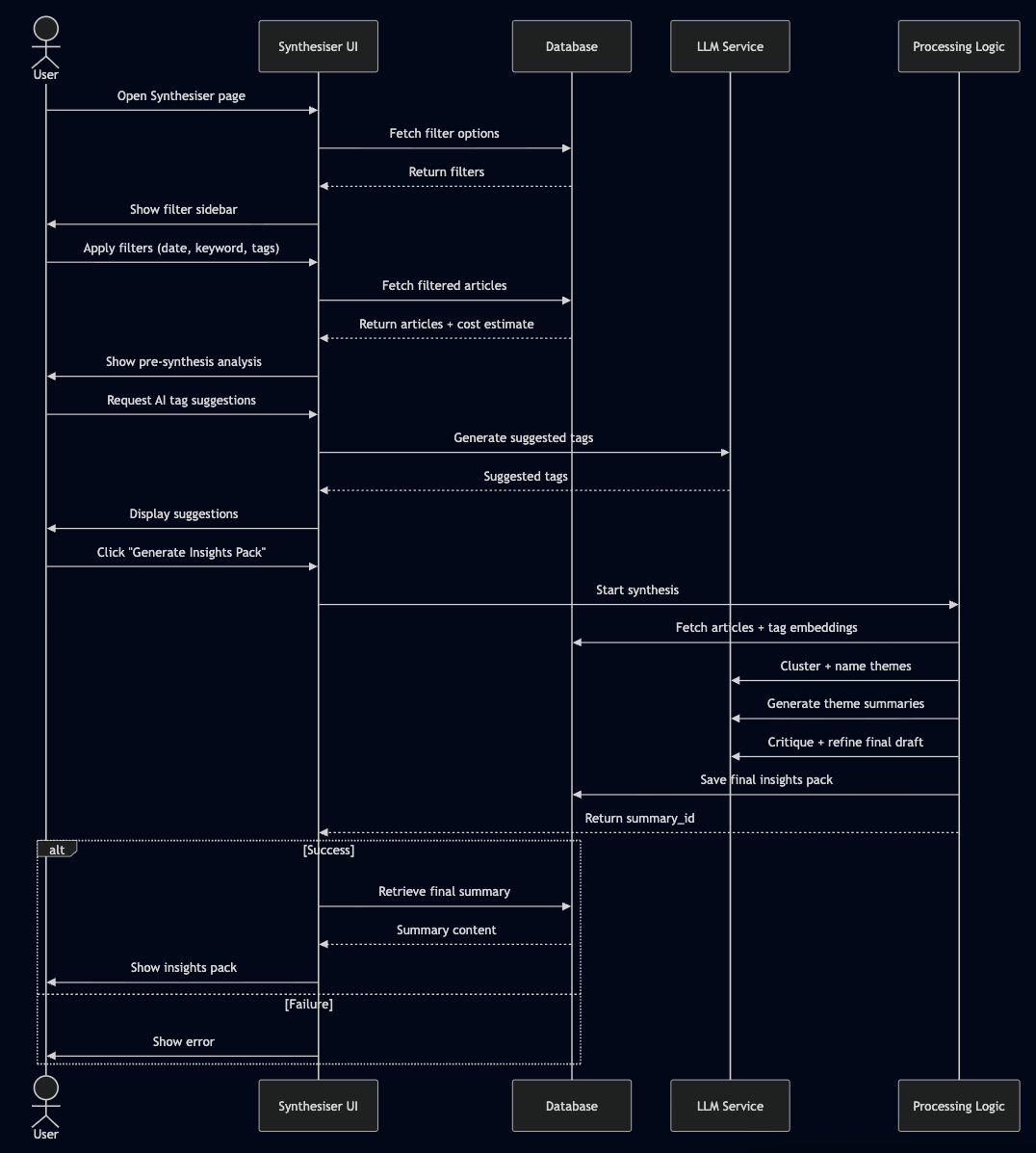
This process intelligently identifies themes within my selection using K-Means clustering on embedded tags, generates a deep-dive summary with citations for each theme, and runs a final "critique" pass to ensure quality. Think of it as the final Editor.
It's the difference between a static newspaper and having a personal research analyst on call.

The Right Tools for the Job
Bringing this to life required a curated set of tools, each chosen for a specific purpose:
Prototyping - The Sandbox: Google AI Studio was my secret weapon. It was the perfect environment for rapidly prototyping and refining every single prompt used in the pipeline. From brainstorming the initial blog post ideas to crafting the exact instructions for the AI Synthesiser, I did it all in the Studio before writing a single line of production code.
UI - The Command Centre: Streamlit is the star of the show for the frontend. Gives me a functional, multi-page application with complex filtering, data visualisation, and interactive components in a fraction of the time it would take with other frameworks. And it's all Python, which I am intimately familiar with; I'm also learning Svelte and TypeScript for other projects.
LLM - The Brains: Google Gemini, orchestrated via litellm. The flexibility to use different models (like the speedy Flash for ingestion and powerful Pro for synthesis) is critical for managing both quality and cost. And Litellm is provider-agnostic, I can choose a different provider from the Streamlit front-end, and it will just work, assuming I have added API keys and have credits.
AI Agent Software Engineer: Gemini Assist in VS Code was my technical partner in improving, refactoring and fixing bugs. I found it better than GitHub Copilot at considering the whole repo and writing highly performant code. It's truly amazing what’s possible with LLM coding agents.
Let's Build Our Own Knowledge Systems
This project has been one of the most rewarding I've ever built. It's a true AI partner that grows smarter every day. And because I believe in the power of personal AI, I am cleaning up the repository and open-sourcing it on GitHub. I will share it along with the final post.
The architecture is designed for you to tinker with, to adapt, and to make your own. You can edit the prompts directly in the UI, schedule the ingestion pipeline to run on a server, replace my LLMs with your favourite, with a bit more work, change the backend to Supabase, and start building your own dynamic knowledge base today.
In my final post, I'll showcase the system in action, highlighting how it has transformed my daily workflow, supercharged my core strengths, and what the future holds for this AI sidekick. And, of course, the latest, clean open-source repository.
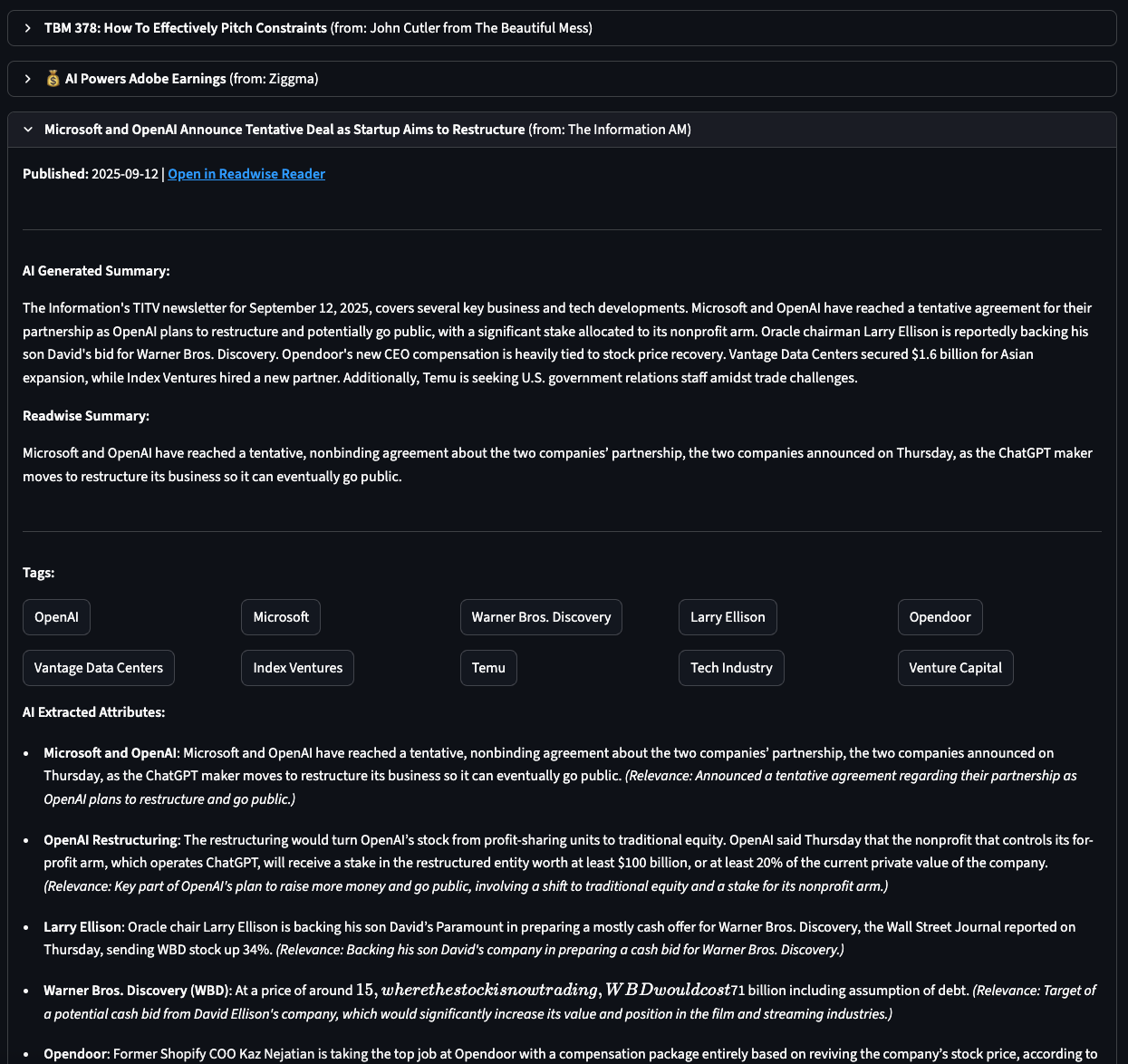
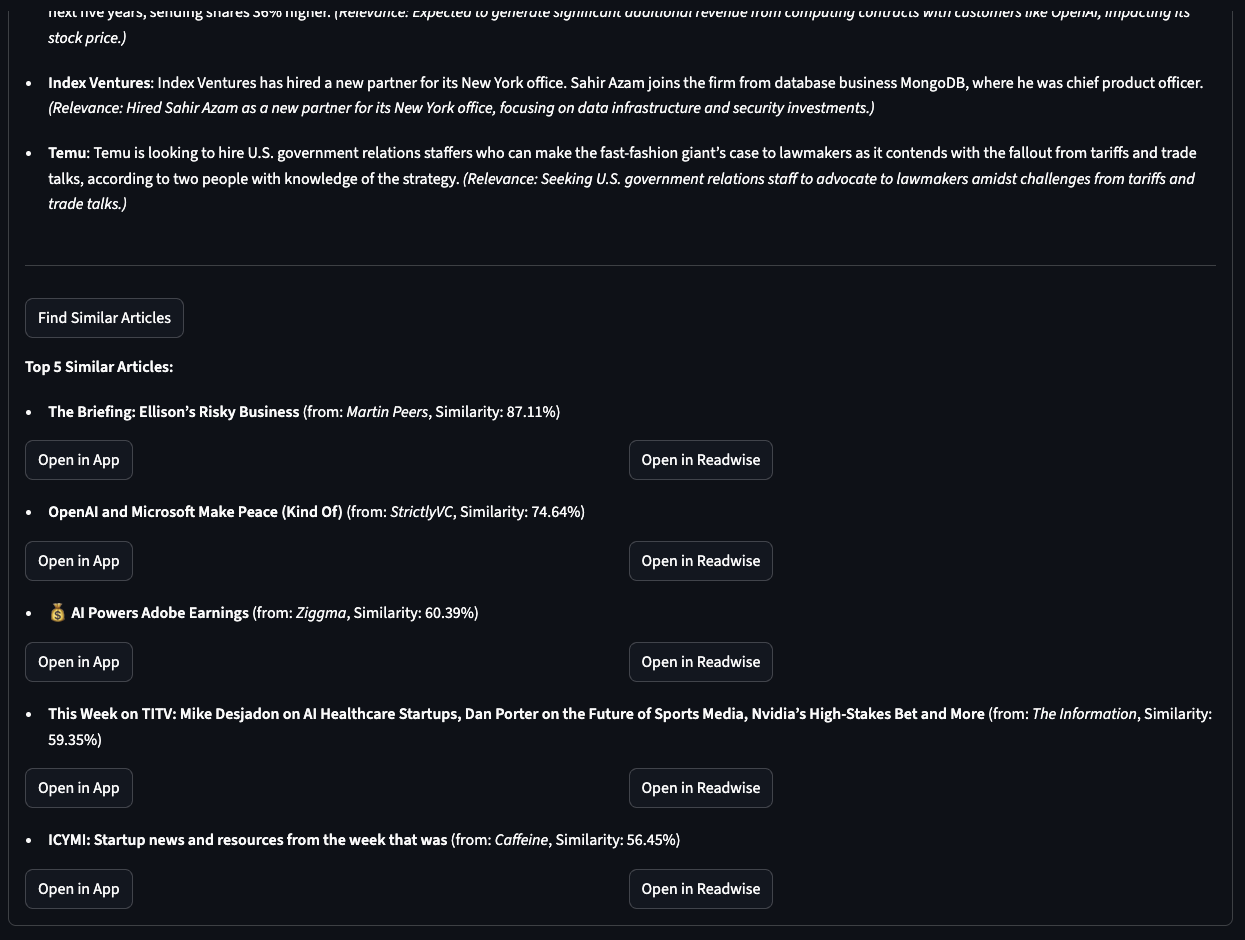
A brief teaser showcasing the analysis for an individual article, including my summary, Readwise summary, tags, and extracted key information. The second image displays the top five “Similar articles” based on embedding-based cosine similarity.
Stay tuned for the last post for more goodness and GitHub repo.
About me
Hi, I am Suhel.
I am writing to jot down things I’ve learned and noticed on my journey. My posts aren’t intended to be polished, shiny pieces of writing; consider them works in progress. They may be interesting to you; if so, enjoy them and feel free to share if you found them valuable. Feedback is always welcome, please let me know.